Campaign health check (Beta)
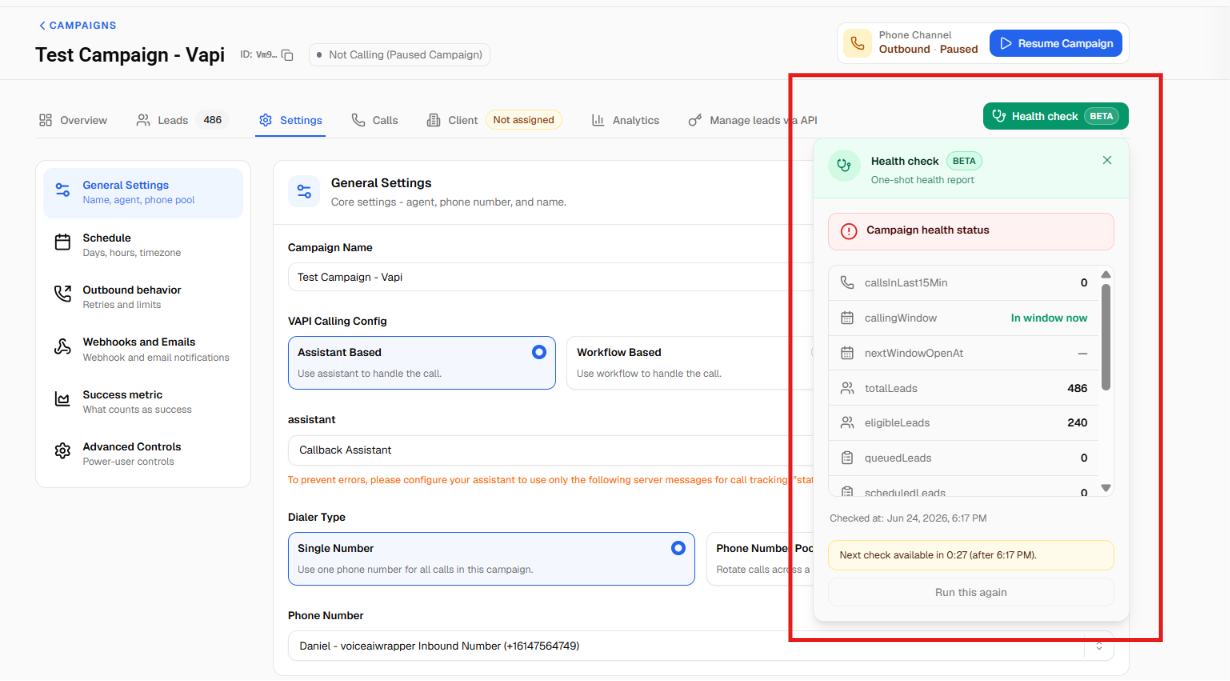
When a campaign isn't behaving the way you expect, you can now run a one-click health check to find out why, without digging through settings.
What's new
Run a check on demand. A "Health check" button (marked Beta) on the campaign details screen runs an instant diagnostic and tells you whether the campaign is healthy, has a warning, or has a problem.
Catches the common blockers, including:
Setup or connection issues with your voice provider.
Campaign state problems: disabled, paused for billing, still in draft, or not yet scheduled.
Running outside the campaign's configured calling hours.
Lead issues for outbound campaigns: no leads left, all answered, all invalid numbers, all on do-not-call, or all at their attempt limit.
Hitting your concurrency limit (calls being slowed down).
Tells you what to do next. Most results come with a clear next step, such as "Enable campaign," "Add leads," "Resolve billing," or "Schedule campaign."
Shows live numbers. Alongside the status, you'll see current figures like total leads, answered, invalid, do-not-call, queued, and calls in the last few minutes.
The health check can be run roughly once every 30 seconds per campaign.