Reorder the whole client portal sidebar
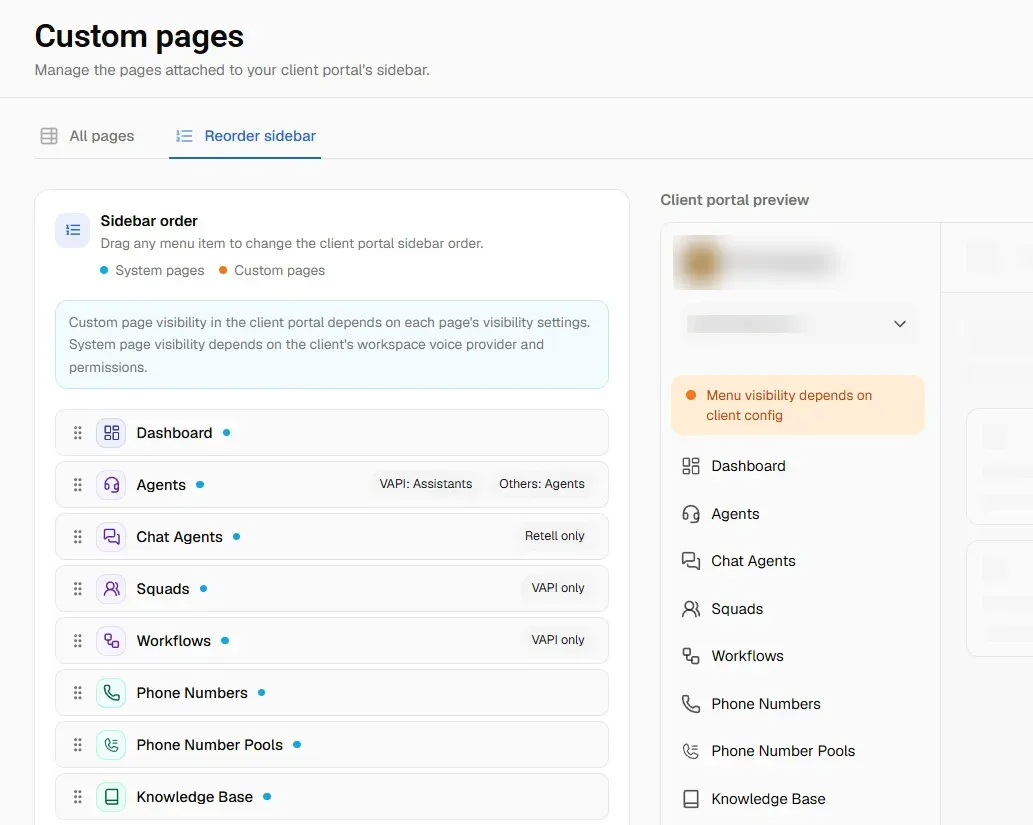
You can now set the order of every item in your client portal sidebar, not just the custom pages you added. Drag them into the order you want and watch the portal update beside you.
What's new
One list for everything. Built-in pages and your own custom pages sit in the same list, colour coded so you can tell which is which.
A live preview. A Client portal preview sits next to the list and reorders as you drag.
Badges tell you where each page appears. Some pages exist only for certain voice providers, and a few are named differently depending on the provider. The list shows this, so you are not ordering something a client will never see.
"Reset to default order" puts everything back if you change your mind.
You will find it under Configuration → Client Portal → Custom Pages → Reorder sidebar. The All pages tab beside it lists every page with its type, path, languages, and who can see it.
The preview shows the full order with every page in it. What a client actually sees still depends on their workspace voice provider and permissions, and custom pages follow the visibility you set on each one