
Changelog

Follow new updates and improvements to voiceaiwrapper.

Bolna: success metric & Custom pages: dynamic variables in the editor.
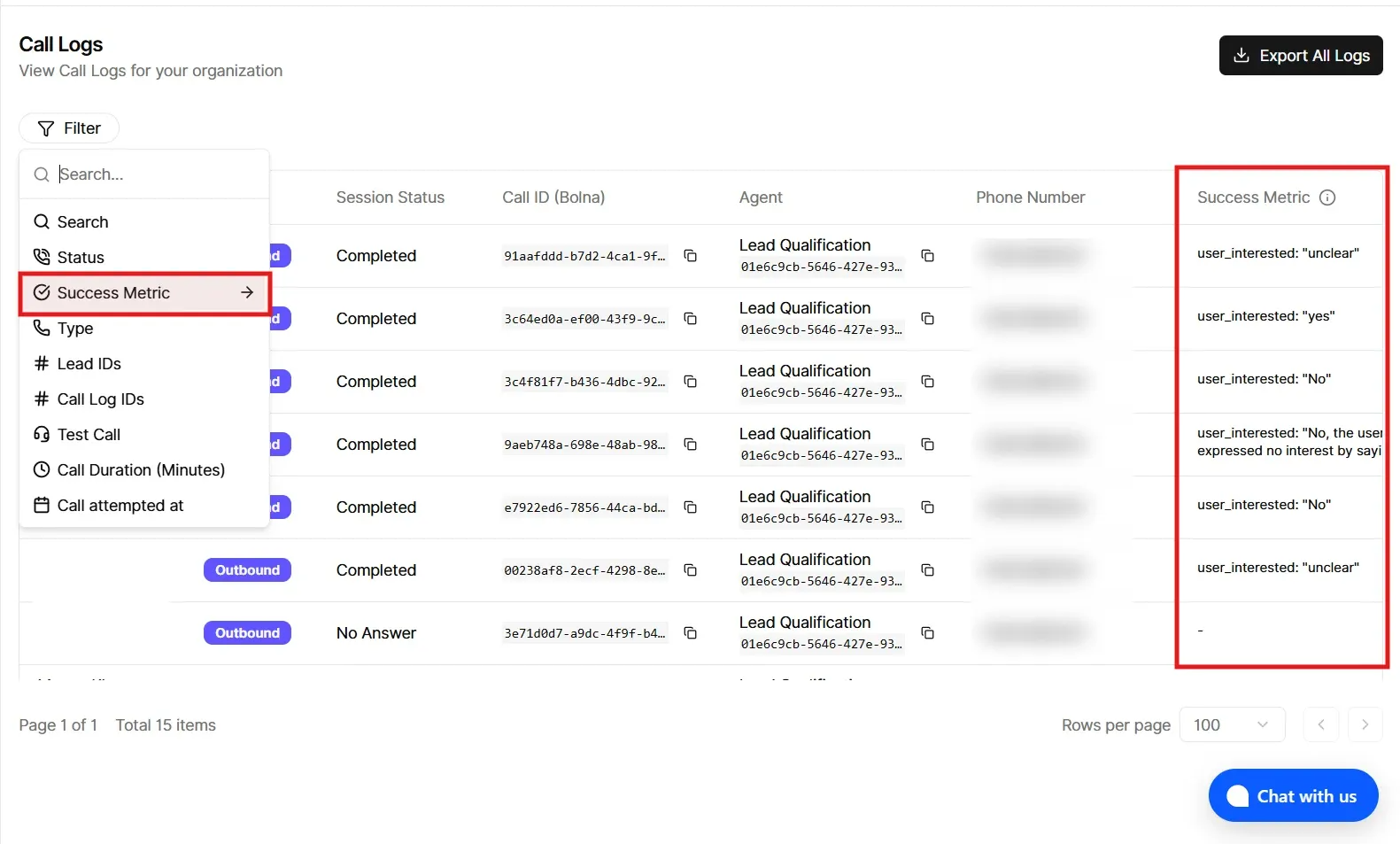
Bolna: success metric in Call Logs

  • Table column: Call Logs now includes a Success Metric column for Bolna. It shows the value from your campaign’s Bolna custom analytics field (the same key you set for call success on the campaign), pulled from that call’s custom extractions.

  • Filters: You can filter Call Logs by that success metric (for example, contains, does not contain, is, is not—same style as your other log filters).

  • Note: The column and filter only apply meaningfully when the campaign has a custom analytics key name configured for the success metric. If nothing is set, you may see empty values.

Custom pages: dynamic variables in the editor

For Custom menu items of type Editor page (rich content / custom page), the editor toolbar now includes Dynamic variables.
You can insert placeholders that are filled in when a client opens the page:

  • Client fields: client name, primary email, and the signed-in user’s email.

  • Portal links: quick links to areas like Dashboard, Assistants, Chat assistant, Campaigns, Phone numbers, Knowledge base, Tools, Call logs, Workflows, Squads, and Phone number pool.

  • Other custom pages: each of your other custom pages appears as a link variable (by its menu label), so you can link between custom pages without pasting raw URLs.

Links respect client access: if a client doesn’t have access to a section or page, that link is not shown for them.
NewImproved

New Features for ElevenLabs Voice Widget

Text Messaging During Voice Calls

  • Users can now send text messages while on an active voice call

  • Perfect for situations where speaking isn't possible or convenient

  • Messages appear in real-time alongside the voice conversation

Real-Time Transcript Display

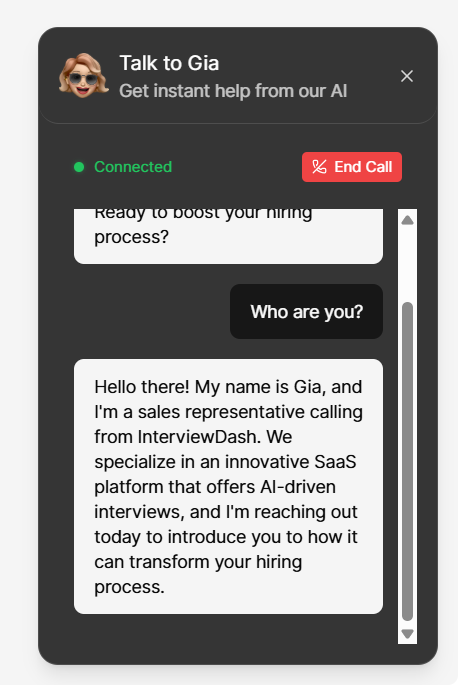
  • View live transcription of the entire conversation during voice calls

  • See both user and agent messages as they happen

  • Helps users follow along and reference what was said

Improved Connection Status

  • Clear visual indicator showing when the voice call is connected

  • Easy-to-access end call button in the connection banner

  • Customizable connection status text and colors

Customizable Text Labels

  • Customize placeholder text for the message input field

  • Customize send button text

  • Customize empty transcript messages

  • All text labels can be translated and localized

Changed

  • Animation styles are automatically hidden when transcript is enabled to provide more screen space for messages

  • Voice calls always start with voice mode (never text-only) for a consistent experience

Notes

  • These features are available only for ElevenLabs voice widgets

  • All features are optional and can be enabled/disabled in the widget configuration

  • Existing widgets continue to work as before - no changes required

NewImproved

Earlier updates